Find your site's WCAG violations before a regulator does
The complete compliance workflow
A scan is step one. Equalvia covers the whole job.
Automated testing, ours included, finds about 57% of accessibility issues. Scanner-only tools stop there, and overlay widgets just hide the gap. Equalvia walks you through the checks no scanner can do, and keeps a dated record of every step so you can show your work.
Automated scan
axe-core plus five checks of our own, across every page of your site, re-run on a schedule.
See the engine- New
Guided manual checks
13 step-by-step checks for what no scanner can judge: keyboard use, screen reader flow, meaningful alt text, form errors, 200% zoom. About 30–45 minutes, no expertise needed.
Fix and verify
A plain-language explanation and a code fix for every issue. Each rescan confirms what's fixed and emails you what came back.
See a sample report- New
Evidence log
Every scan, manual result and exclusion, dated, in one PDF, plus an accessibility statement drafted from your results.
Why it matters
The EAA has no certificate. Your proof is the paper trail.
When a market surveillance authority or a customer asks, what counts is what you tested, what you found and what you fixed, and when. National authorities check services against the Act, follow up complaints and verify that corrective action was taken. EAA, Article 23 (opens another site in a new tab)
- A dated log of every automated scan and its open issues
- Your manual check results, with dates and notes
- Issue types you excluded, listed openly rather than hidden
- An accessibility statement pre-filled from the results
Guided manual checks are on every plan, free accounts included. The evidence log is part of the PDF report on Starter, Growth, Agency and the one-off compliance package.
Open the sample PDF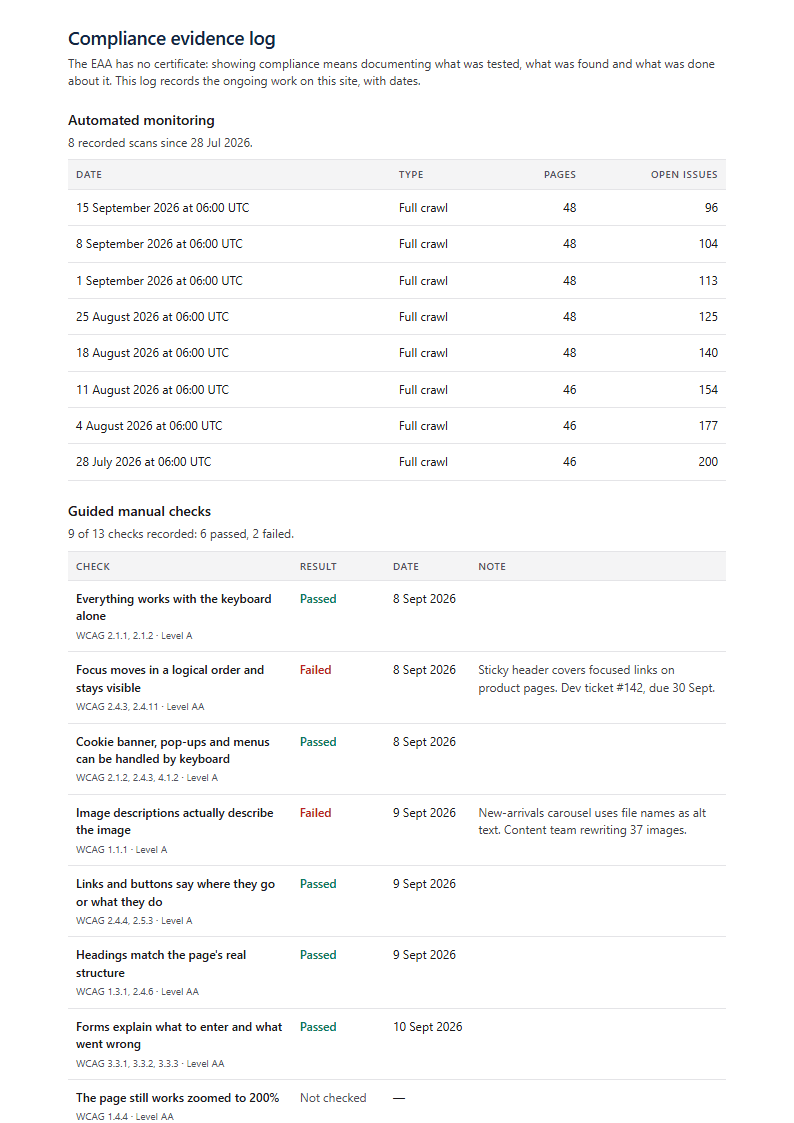
01Our own scan engine
A clean Lighthouse score doesn't mean you pass WCAG
Many free scanners — and Google Lighthouse itself — are an axe-core run and nothing more. Equalvia runs axe-core too, then renders, focuses, zooms and measures your pages the way a real user would, catching failures axe-core marks as "needs review" or can't test at all.
- 1Browser
- 2Crawler
- 3axe-core
- 4Additional checks
- 5Issue analysis
- 6Developer-ready report
| Check | axe-core / Lighthouse alone | Equalvia |
|---|---|---|
| Text contrast over gradients and imagesNoaxe-core / Lighthouse alone: Skipped — left for manual review | NoSkipped — left for manual review | YesMeasured on the real pixels |
| Wrong declared page languageNoaxe-core / Lighthouse alone: Any valid lang code passes | NoAny valid lang code passes | YesDetects the real language (15 EU languages) |
| Visible keyboard focusNoaxe-core / Lighthouse alone: Not tested | NoNot tested | YesEvery link and button focused and compared |
| 320px reflow (400% zoom)Noaxe-core / Lighthouse alone: Not tested | NoNot tested | YesPoints to the element that overflows |
| Text spacingPartlyaxe-core / Lighthouse alone: Only inline !important styles | PartlyOnly inline !important styles | YesReal spacing applied, clipped text reported |
| Whole site, re-checked on scheduleNoaxe-core / Lighthouse alone: One page per manual run | NoOne page per manual run | YesMulti-page crawl + scheduled rescans |
| Fix for each issuePartlyaxe-core / Lighthouse alone: Rule description and docs link | PartlyRule description and docs link | YesPlain-English explanation + code fix |
Automated tools still can't judge everything — like whether alt text is genuinely meaningful. We test what we can and say plainly what we haven't yet — see our full accessibility statement.
02The report
It doesn't just find issues. It shows you how to fix them.
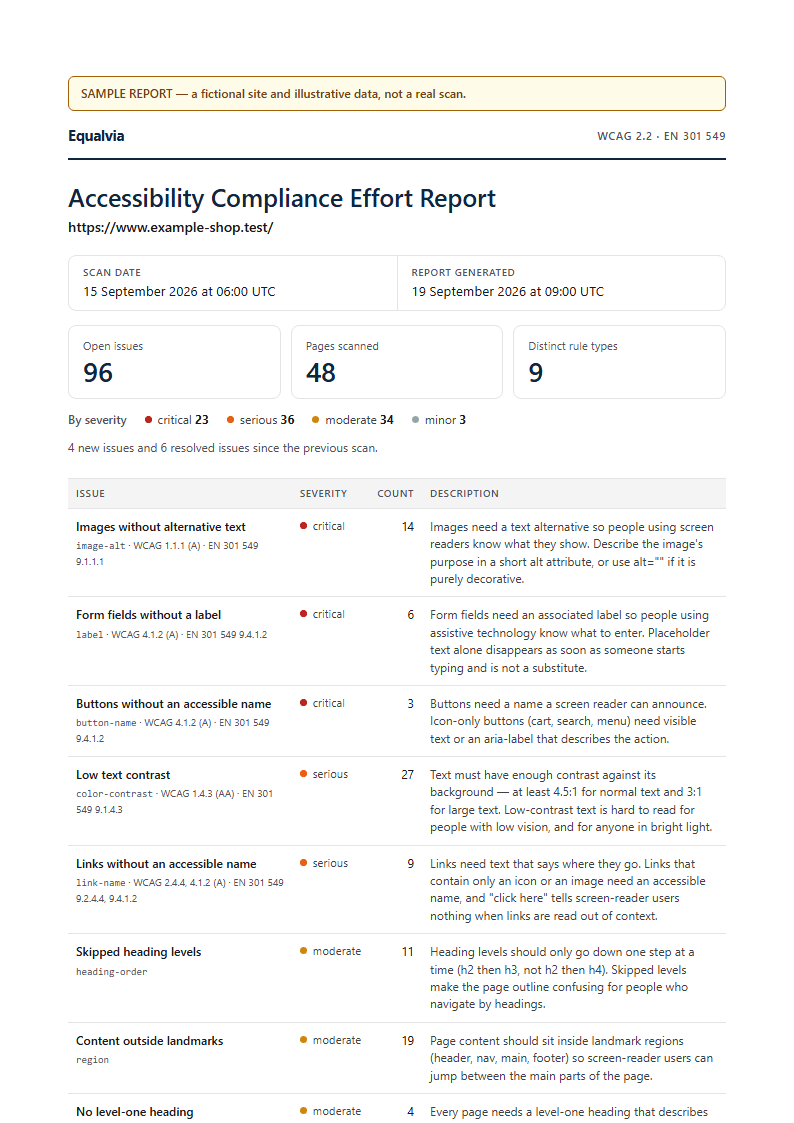
Every scan produces a severity-ranked issue list with a plain-English explanation and a concrete, pasteable code fix — not just a rule ID.
- critical
Images without alternative text
image-alt
How to fix thisWhat we found
Screen reader users have no way to know what this image shows or does — if it's also a link, they may not even know it's clickable.
img.hero-bannerSuggested fix
<img src="/hero-banner.jpg" alt="Team working in the dev office"> - serious
Form fields without a label
label
How to fix thisWhat we found
Without a programmatic label, screen readers just announce "edit text" — there's no indication of what to enter.
input#email-signupSuggested fix
<label for="email-signup">Email address</label>
<input id="email-signup" type="email">
PDF report
For auditors and clients
A downloadable, shareable compliance report on the Starter, Growth and Agency plans.
Made-up site, fictional data
Multi-page crawls
One scan can crawl up to hundreds of pages depending on your plan, not just the homepage.
WCAG and EN 301 549
Every finding carries its WCAG success criterion and the matching EN 301 549 clause, in the dashboard and the PDF.
Data export
Every site, scan and issue found can be exported as JSON, anytime.
Sample for illustration — a real report lists the actual issues found on your site.
03Continuous monitoring
Fixed once ≠ fixed forever
A new piece of content, a plugin, or a change made by an AI coding tool that doesn't remember what it fixed last time can bring the same WCAG issues right back. That's the real value of a subscription: not a one-time fix, but catching it the moment it happens again.
- Scheduled rescans: weekly, every 3 days or daily, depending on your plan
- An email digest on change: new and resolved issues
- Every rescan compared with the last — see what was fixed and what came back
example.com · open issues
Sample- 47
Scan 1
Issues found
- 0
Scan 2
Fixes confirmed
- 1
Scan 3
New issue → email
- 0
Scan 4
Clean again
Email alert
1 new, 0 resolved on example.com
Overlays don't fix the underlying code
Accessibility overlay widgets patch symptoms in the browser at runtime. They don't touch your actual markup, and regulators and disability organisations have now said plainly that they don't make a site compliant. Equalvia finds the real WCAG violations in your code and tells you exactly what to change, priced near what overlay vendors already charge.
- April 2025: the US Federal Trade Commission ordered overlay vendor accessiBe to pay $1 million for claiming its widget could make any website WCAG-compliant. FTC (opens another site in a new tab)
- The European Disability Forum and the IAAP: overlays “do not make the website accessible or compliant with European accessibility legislation.” EDF–IAAP statement (opens another site in a new tab)
Overlay widget
- Patches symptoms in the browser at runtime
- Never touches your actual markup
- Not a route to compliance, say the FTC and the EDF
Equalvia
- Finds the real violations in your code
- Tells you exactly what to change, with a code fix
- Monitors on a schedule and emails you when something changes
Who it's for
EU-facing companies of roughly 10–250 employees — above the EAA's micro-enterprise exemption, below the size that gets a dedicated compliance team.
SaaS teams
Ship accessible products without slowing engineering down — issues arrive as pasteable code fixes.
E-commerce
Catch accessibility issues across your most important pages and user journeys, before shoppers or a regulator find them.
Agencies
Monitor accessibility across every client site in one place, with white-labeled PDF reports.
Frequently asked questions
What is WCAG?
What does Equalvia actually test?
Does Equalvia replace a manual audit?
How do I prove my site complies with the EAA?
Is my site legally compliant after a scan?
Isn't there a grace period until 2030?
How long does a scan take?
What happens to the data collected during a scan?
What sites can be scanned?
Find your accessibility issues before your users do
Scan your site in minutes — free, no signup required. Sign up to unlock the full issue list, or pick a plan for scheduled monitoring and PDF reports.
- First scan free, no signup
- Guided manual checks free on every account
- No lock-in — cancel anytime
- About 20% off with annual billing
Plans from€19/month